Inbox scanning
This article explains how the automated inbox scanning works, how you can trigger it and how you can troubleshoot.
Types of inboxes
With invoice grabber you can connect the following types of inboxes:
- Gmail inbox (or any inbox in the g-suite)
- Microsoft inbox
- Imap inbox
Connect an inbox either by selecting integration sources in the left menu
or from the settings (settings > general > inbound integrations)
Automated Scans
Once you connect your inbox, Invoice grabber will regularly check on new invoices in your mailbox. Once an invoice is found, it will sync the invoice to the platform.
- Grabbing: What will be grabbed? All mails containing a pdf invoice document or references a document. For mails containing a link to an invoice, please see the note below.
- Frequency: At current, invoice grabber is scanning your inbox every hour. It will only scan the invoices that are new since the last check. In case you need to rescan the inbox for invoice before that last scan, please see the manual trigger section.
After invoices are retrieved from the inbox(es), the documents will be read and workflows can start.
Rescanning your Inbox
When first connecting your inbox, it will do a thorough sweep of your inbox to get all invoices of the last period. It can happen tough that an invoice was deleted or you want to enforce a manual rescan.
Follow these steps to trigger a rescan.
Go to the settings > sources
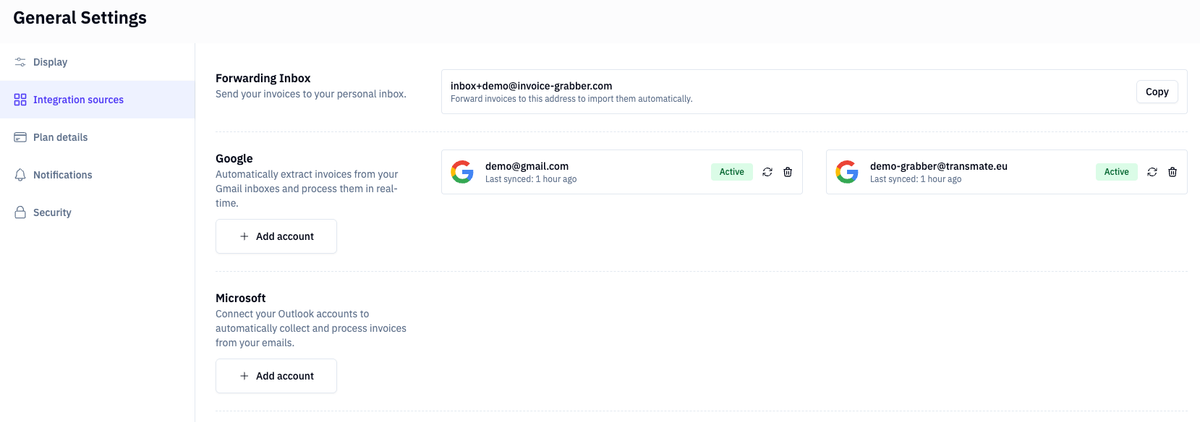
Click on the rescan icon.
Now, the inbox will be scanned. The invoices will start popping up in your invoice overview screen.
Missed documents
Did we forget an invoice? No worries: forward the email to your dedicated grabber inbox:

Troubleshooting
It can happen we lost the connection with your inbox. If that happens, you will see an exclamation in the left menu:
or in the settings:
You can fix the connection by clicking on it, and you will go through the oAuth connection screen once again. After successfully reconnecting the inbox, the scan will start immediately and the invoices since last scan will be fetched.
Imap failed to fetch
Many mail providers are actively blocking IP's which can cause our invoice extraction workers to fail. You can fix this to white list our worker by ip:
- IPv4: 209.71.90.84
- IPv6: 2a09:8280:e612:1:0:92:5702:0
This allows us to reach the inbox and do our magic. If you need a hand with this, ask your IT dep to add these ips to the whitelist.
Security & Privacy
Invoice Grabber is undergoing regular audits by an independent auditor on data safety. We are an official Microsoft partner and are SOC2 verified. We are scanning very strict on invoices and only the documents that qualify as an invoice are read and stored.
At no time we are writing to your inbox, at no time we are reading emails, at no time private information is accessed. We take data privacy very serious and have therefore all controls in place to make sure we only access the documents and information to extract and validate invoice documents.

